What Hairstyle and Hair Color Suit Me? A Practical Try-On Guide
Learn how to choose a hairstyle and hair color using your face, undertone, hair texture, routine, and realistic AI previews before a salon visit.
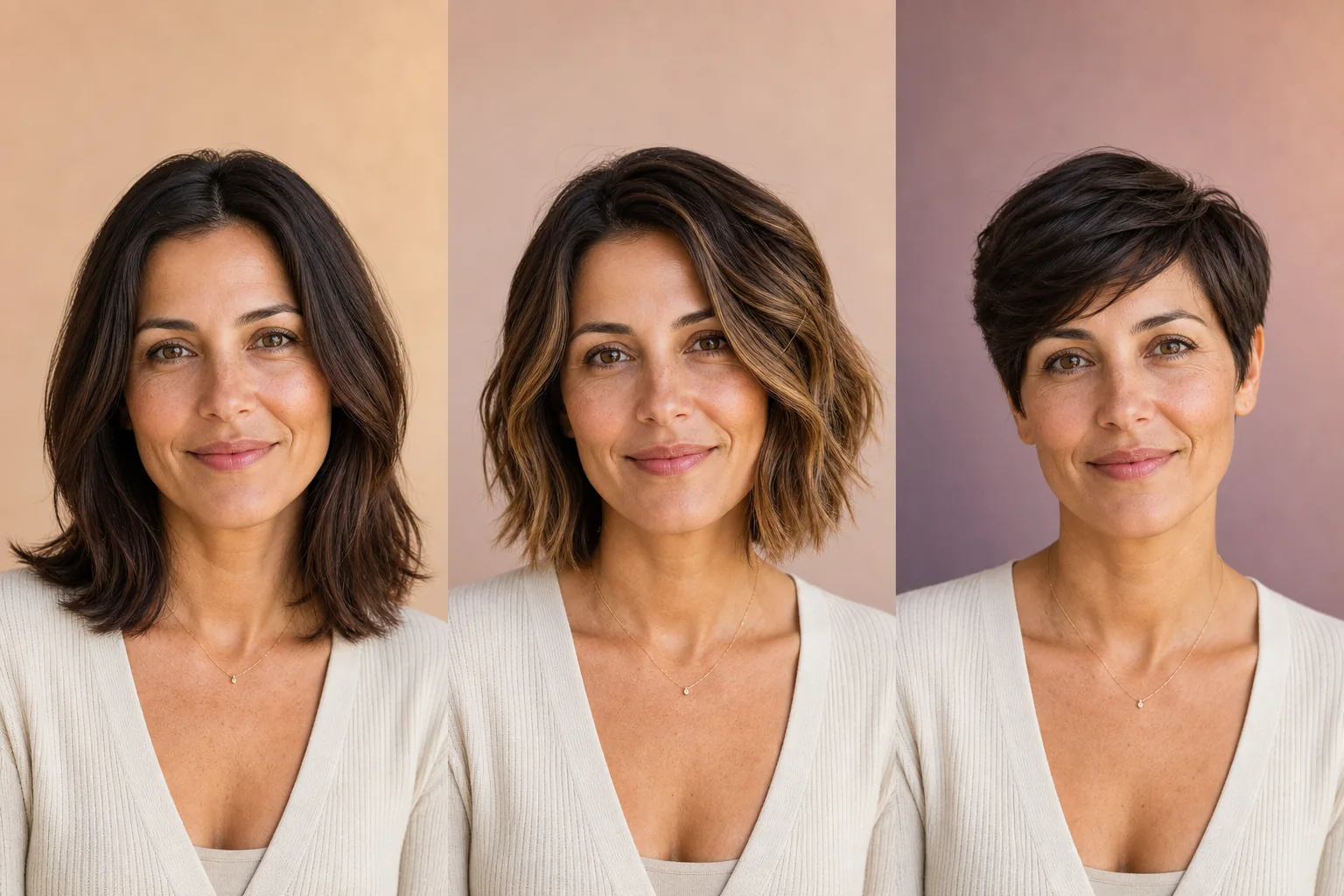
Changing your hair can feel exciting right up until the decision becomes real. A saved photo may look perfect on someone else, yet you may still wonder: Will that haircut frame my face the same way? Will that color flatter me in daylight? Will I actually style it every morning?
The useful answer is not a universal list of “best” hairstyles. It is a short process that combines visual proportion, hair texture, color direction, daily effort, and comparison on your own photo.
Quick answer: Start with the hairstyle because length, volume, fringe, and parting change the frame around your face. Then compare hair colors on the strongest one or two cuts. Use face shape and skin undertone as starting clues, not rules. Finally, check whether the result works with your real hair, maintenance budget, and salon plan.
Reviewed and updated: August 7, 2026
Author: YuzuTime Editorial Team
Editorial scope: This guide helps with visual planning. It does not diagnose hair or scalp conditions, predict chemical color results, or replace advice from a qualified stylist or dermatologist.
Image disclosure: The portrait comparisons in this article are AI-created editorial illustrations. They demonstrate a decision process and are not product-output benchmarks or promises of an identical real-world result.
What Should You Consider Before Choosing a New Look?
Before thinking about an oval face, cool undertone, or trending cut, write down what you want the change to accomplish. A hairstyle that looks attractive in one photo can still be wrong for the job you need it to do.
Ask yourself five practical questions:
- How much change do I want? A different part or subtle face-framing layer is lower commitment than a pixie cut or full bleach.
- How much daily styling will I do? Be honest about heat tools, drying time, products, and salon visits.
- Which features do I want to emphasize? Examples include cheekbones, eyes, curls, jawline, or natural gray.
- What must stay the same? You may need enough length for a ponytail, a conservative work look, or a color that grows out softly.
- What is my real starting point? Density, curl pattern, previous dye, damage, and natural base color all affect what a stylist can safely create.
These answers are more useful than asking whether one haircut is objectively “right.” They turn a vague makeover into a testable brief.
Choose the Hairstyle First, Then the Hair Color
When both cut and color change at once, it becomes difficult to tell which part is helping or distracting. A better comparison changes one major variable at a time.
Start with the shape of the hair:
- Overall length
- Volume at the crown or sides
- Straight, wavy, or curly texture
- Fringe or no fringe
- Center, side, or swept part
- Tapered, blunt, or layered outline
Once two or three silhouettes look promising, compare color on those versions. This order matters because a platinum pixie and long platinum waves create very different contrast around the same face.
If color is your only planned change, keep your current hairstyle in the preview. That gives you a cleaner comparison and a more useful reference for your colorist.
What Hairstyle Suits Your Face Shape?
Face shape can help you notice proportion, but it should not become a beauty rule. Most faces do not fit one perfect category, camera lenses can change apparent proportions, and your preferred effect may be balance, contrast, softness, or deliberate drama.
To make a rough assessment, use a front-facing photo taken at eye level. Pull the hair away from the outer edge of your face and compare the apparent width of your forehead, cheekbones, and jaw with the length from hairline to chin.

Use the table below as a list of experiments rather than a list of restrictions.
| If your face appears... | You might test... | What to look for in the preview |
|---|---|---|
| Oval or softly balanced | Bob, layered, pixie, straight, wavy, or tied styles | Whether the cut expresses your style without hiding the features you like |
| Round or similar in width and length | Longer layers, side-swept pixie, crown volume, off-center part | Whether vertical lines or asymmetric volume create the effect you want |
| Square or strong at the jaw | Waves, curved layers, textured fringe, sleek blunt lines | Compare soft contrast with a deliberately graphic jaw-length shape |
| Heart-shaped or wider at the forehead | Chin-length bob, side fringe, waves with lower volume | Whether weight around the jaw feels balanced or too bottom-heavy |
| Long or oblong | Fringe, bob, shoulder-length layers, side volume | Whether added width or a shorter visual frame changes the proportions pleasantly |
| Diamond or prominent at the cheekbones | Side-swept fringe, chin-length shapes, tucked styles | Whether the cut highlights or softens the cheekbone line |
The best result may deliberately break the expected suggestion. Someone with a round face may love a round bob; someone with a square jaw may prefer a blunt cut that emphasizes it. Your preference is part of the answer.
Hair texture and density matter more than a label
A reference photo shows a shape, but the final haircut is built from real hair. Consider:
- Texture: Straight, wavy, curly, and coily hair create different shrinkage and volume.
- Density: A heavily layered look can behave differently on fine, medium, and dense hair.
- Growth patterns: Cowlicks and hairline direction affect fringes, parts, and short cuts.
- Condition: Bleached, heat-damaged, or fragile hair may limit a combined cut-and-color plan.
- Routine: A style that needs a round brush every morning is not low-maintenance just because the finished photo looks effortless.
Use the YuzuTime AI Hair Style Changer to compare templates such as a bob, layered cut, pixie, wavy style, buzz cut, wolf cut, quiff, or curly look on the same portrait. If the preset is close but not exact, describe the length, fringe, part, and texture you want in the custom option.
What Hair Color Suits Your Skin Tone?
Skin undertone is one useful clue for choosing a hair-color direction. It is not a permission system. You can choose harmony by repeating similar warm or cool notes, or choose contrast on purpose.
Undertone refers to the subtle warm, cool, or neutral cast beneath the surface of the skin. It is not the same as how light or deep your skin is. Dyson's current hair color theory guide describes warm, cool, and neutral undertones and also notes that contrast changes the overall effect.
Common at-home clues include comparing whether cream or pure white is more flattering in natural light and observing whether gold or silver jewelry feels more harmonious. These tests are imperfect: mixed undertones, lighting, camera processing, redness, and personal taste can all affect the result.

| Color direction | Shades to preview | Questions to ask |
|---|---|---|
| Warm | Caramel, honey blonde, golden brown, copper, warm auburn | Does the warmth brighten your overall coloring or make it feel too similar? |
| Cool | Ash brown, espresso, platinum, smoky lavender, blue-black | Does the cooler contrast look clear and intentional or too stark for your preference? |
| Neutral | Balanced brunette, beige blonde, soft brown, muted balayage | Does a less strongly warm or cool result keep the focus where you want it? |
Temperature is only one part of hair color
Two shades can both be warm and still look completely different. Compare four variables:
- Depth: How light or dark the hair appears
- Temperature: Warm, cool, or balanced
- Saturation: Muted and smoky or vivid and intense
- Placement: Solid color, face-framing pieces, highlights, ombré, or balayage
Depth often creates the strongest change. Dark hair against lighter skin can feel graphic and high-contrast; closer values can feel softer. Neither effect is automatically more flattering.
Your current color also affects what is physically achievable. An AI preview can show a visual destination, but it cannot tell you how many lightening sessions you need, how your underlying pigment will lift, or how porous sections will take dye. A colorist needs your color history to answer those questions.
Use the YuzuTime AI Hair Color Changer to compare natural shades, balayage looks, blonde, copper, red, platinum, and creative colors. The color picker is useful when you already have a target hue; the custom option is better when placement matters, such as “subtle caramel face-framing highlights on an espresso base.”
Hairstyle and Hair Color Combinations to Try
You do not need to generate dozens of random looks. Start with combinations that answer a specific question.
| Combination to test | What it helps you evaluate |
|---|---|
| Bob + caramel macchiato balayage | Whether a shorter outline and warm dimension feel polished or too different at once |
| Layered cut + espresso | Whether movement still reads clearly in a deep, relatively uniform color |
| Side-swept pixie + platinum ice | Whether you enjoy both the exposed face shape and high color contrast |
| Wavy hair + cowboy copper balayage | Whether warmth and texture together feel rich or visually busy |
| Wolf cut + dark purple | Whether an expressive shape and creative shade fit your personal style |
| Buzz cut + raven black | Whether a minimal silhouette with strong depth gives the impact you want |
| Curly style + golden blonde | Whether lighter dimension makes the curl pattern more visible in a preview |
For each combination, save one version you love, one conservative alternative, and one “too far” version. The extreme option clarifies your boundaries and often makes the middle choice easier.
How to Preview a Hair Makeover with AI
Virtual try-on is most useful as a comparison tool. L'Oréal's virtual hair color workflow similarly centers on uploading or capturing an image, trying shades, and comparing results. The following process adds controls that make your comparisons more consistent.
1. Take a neutral source photo
Use soft daylight facing a window, keep the camera near eye level, and photograph your full hairline and shoulders. Avoid hats, strong beauty filters, colored lighting, deep shadows, and hair covering most of your face. A plain background helps you judge the outline.
2. Keep a baseline
Save the original photo. Every generated result should be compared with the same baseline, not with another edited image that may already have changed facial detail or lighting.
3. Write a one-sentence goal
For example: “I want a shorter style that still ties back,” or “I want warmer color without a bright blonde result.” This sentence becomes your filter when several previews look attractive.
4. Test three hairstyle families
Choose a safe option, a moderate change, and a high-change option. For example:
- Long layers
- Chin-length bob
- Side-swept pixie
Keep the color close to your current hair during this step.
5. Compare structure, not AI polish
Look at length, width, volume, fringe, parting, and how much of your face is visible. Ignore small differences in skin, makeup, jewelry, or background. Those are generation artifacts, not reasons to choose a haircut.
6. Test color on the best one or two styles
Compare a close-to-natural shade, a warmer or cooler variation, and a bolder option. Keep the hairstyle unchanged so the color decision remains readable.
First compare shape
Focus on length, fringe, part, and volume. Keep the hair color close to your current shade.
Open AI Hair Style Changer →Then compare color
Keep the cut stable while changing depth, temperature, or placement.
Open AI Hair Color Changer →7. Review the finalists in different contexts
Do not judge only while zoomed into your face. Look at the image small, place it beside your normal profile photo, and revisit it the next day. Ask whether the look works with your wardrobe, glasses, makeup preferences, workplace, and usual styling effort.
8. Turn the preview into a salon brief
Bring the original photo, your preferred preview, and one real-world reference that shows the cut from another angle. Tell the stylist which elements matter most and which are flexible. A generated front view is a conversation starter, not a technical cutting or color formula.
How Accurate Is an AI Hairstyle or Hair Color Preview?
An AI preview can answer directional questions:
- Do I like seeing more of my forehead?
- Does a short silhouette feel like me?
- Do I prefer warm or cool contrast near my face?
- Does a darker color overpower the haircut?
- Which two ideas deserve a professional consultation?
It cannot reliably predict:
- The exact fall, shrinkage, or movement of your real hair
- How a cut looks from every angle
- Whether your density supports the reference shape
- How existing dye and underlying pigment will lift
- The number, cost, or safety of salon sessions
- Exact color under daylight, bathroom light, and phone processing
- Growth, fading, root contrast, or maintenance over time
AI may also alter the face, hairline, ears, jewelry, makeup, lighting, or background. Reject a preview if those changes are doing more work than the hair. For a fair comparison, the face and photo conditions should remain as stable as possible.
Common Mistakes That Make Hair Previews Less Useful
Changing the cut, color, makeup, and lighting together
The result may look impressive, but you will not know which change created the effect. Isolate the haircut first and color second.
Using a celebrity photo as the only reference
A celebrity image can communicate a mood, but differences in density, texture, extensions, styling, lighting, and retouching matter. Pair it with a preview on your own photo and a stylist's assessment.
Treating face-shape advice as a prohibition
“Round faces cannot wear bobs” and similar rules are too rigid. Test the bob's exact length, volume, and part instead of rejecting the whole category.
Choosing only by skin undertone
Undertone helps organize color options, but desired contrast, eye color, wardrobe, personal identity, natural base, and maintenance also affect the decision.
Asking AI to prove a color is achievable
A generated platinum result does not show the chemical process required to reach platinum from previously dyed dark hair. Only a qualified professional who knows your color history can assess that path.
Sending one generated image with no explanation
Tell your stylist what you like: the jaw-length perimeter, airy fringe, copper temperature, soft root, or face-framing placement. The details are more actionable than “make me look exactly like this.”
Hair Dye Safety Before You Make the Change
A visual preview does not test a product or your skin. The U.S. Food and Drug Administration advises users to follow the package directions and perform a skin patch test before using hair dye, each time they dye their hair. Read the full FDA hair dye safety guidance rather than improvising a test.
The American Academy of Dermatology also advises testing store-bought color according to the manufacturer's instructions. If redness, rash, swelling, burning, or itching develops, do not use the dye and consult a dermatologist about further testing. Its coloring and perming guidance also notes that greater lightening generally requires stronger processing and can cause more damage.
If you have scalp symptoms, a history of reactions, very fragile hair, or a major correction planned, seek appropriate professional advice before coloring.
A Salon-Ready Hair Makeover Checklist
Save this list with your final images:
- Original, unedited source photo
- Preferred haircut preview
- Conservative backup option
- Preferred color direction and depth
- One example of what you do not want
- Front, side, and back reference photos when available
- Natural texture and typical styling routine
- Complete previous color and chemical-treatment history
- Maximum acceptable length change
- Whether you need to tie the hair back
- Maintenance budget and appointment frequency
- The two or three details that matter most
A good consultation may change the plan. That does not make the preview useless; it means the preview successfully helped you communicate the destination.
Build your comparison in two steps
Start by comparing length, fringe, texture, and volume with the AI Hair Style Changer. Then keep your preferred silhouette and compare shades with the AI Hair Color Changer.
Frequently Asked Questions
How do I know what hairstyle suits me?
Define the effect and maintenance level you want, then compare several silhouettes on the same front-facing photo. Face shape can suggest what to test, but hair texture, density, growth patterns, and personal style determine whether the idea works for you in practice.
Should I choose a haircut based on my face shape?
Use face shape as a starting point, not a rule. It can help you evaluate length, width, fringe, and volume. It should not stop you from choosing a style you enjoy or from emphasizing a feature rather than “correcting” it.
What hair color suits my skin tone?
Warm undertones often harmonize with caramel, honey, golden brown, and copper, while cool undertones often harmonize with ash, platinum, cool brunette, and blue-black. Neutral undertones can work across both directions. You can also choose deliberate contrast, so preview multiple depths and temperatures rather than relying on undertone alone.
Can I try bangs before cutting them?
Yes. Compare more than one fringe type, such as curtain, side-swept, wispy, or blunt bangs. Pay attention to coverage, width, and parting, then ask a stylist how your hairline, cowlicks, texture, and daily routine affect the real cut.
Should I test a hairstyle or hair color first?
If both will change, test the hairstyle first while keeping the color close to your current shade. Once you choose one or two strong silhouettes, compare color on those versions. If you only plan to dye your hair, keep the current cut unchanged.
How accurate are AI hair try-ons?
They are most useful for comparing direction, proportion, and color contrast. They are not exact predictions of hair movement, chemical results, side and back views, maintenance, or salon feasibility. Small changes to the face and lighting can also occur.
What photo works best for a virtual hairstyle try-on?
Use a sharp, front-facing portrait taken at eye level in soft natural light. Show the complete hairline and shoulders, use a simple background, and avoid hats, strong filters, colored lighting, deep shadows, and hair covering most of the face.
Can I show an AI hair preview to my stylist?
Yes. Bring the original image as well and explain the specific elements you like. Add real-world side and back references when possible. Let the stylist adapt the idea to your texture, density, color history, condition, and maintenance goals.
Does an AI preview mean a hair color is safe or achievable?
No. A preview is a visual concept. It cannot assess allergies, scalp health, hair damage, underlying pigment, previous dye, required processing, or safe session timing. Follow product safety instructions and consult an appropriate professional for the real process.
Sources and Editorial Method
This article combines YuzuTime's current hairstyle and hair-color preview workflows with consumer guidance from primary or clearly identified sources. Recommendations are framed as experiments because aesthetic preferences and hair characteristics differ from person to person.
- FDA: Cosmetics Safety Q&A — Hair Dyes
- American Academy of Dermatology: Coloring and Perming Tips for Healthier-Looking Hair
- Dyson: Hair Colour Theory — Which Colour Suits Me Best?
- L'Oréal Paris: Virtual Hair Color Try-On
Product behavior and external guidance can change. The publication and review date at the top shows when this guide was last checked.
Related YuzuTime tools
AI Hair Style Changer
Try female and male hairstyle templates or describe a custom haircut on your own portrait.
AI Hair Color Changer
Compare natural, balayage, blonde, red, and creative colors before making a real-world change.
AI Photo Editor
Make a more specific portrait edit with a written instruction when you need a custom visual reference.